Resources
Resources
Overview
The Resources group centralizes tools for automating market monitoring and discovering new investment ideas. This includes real-time Alerts an Ideas panel that provides investment inspiration through a “Screener of the Week” and various proven themes, a comprehensive Earnings Calendar, and a Metric Browser with definitions for over 800 metrics.
Featured: The Library
The Library is a collection of pre-built research resources that you can import directly into your account. It features a wide variety of expert-curated screeners, model portfolios, watchlists, and data views designed to jumpstart your analysis.
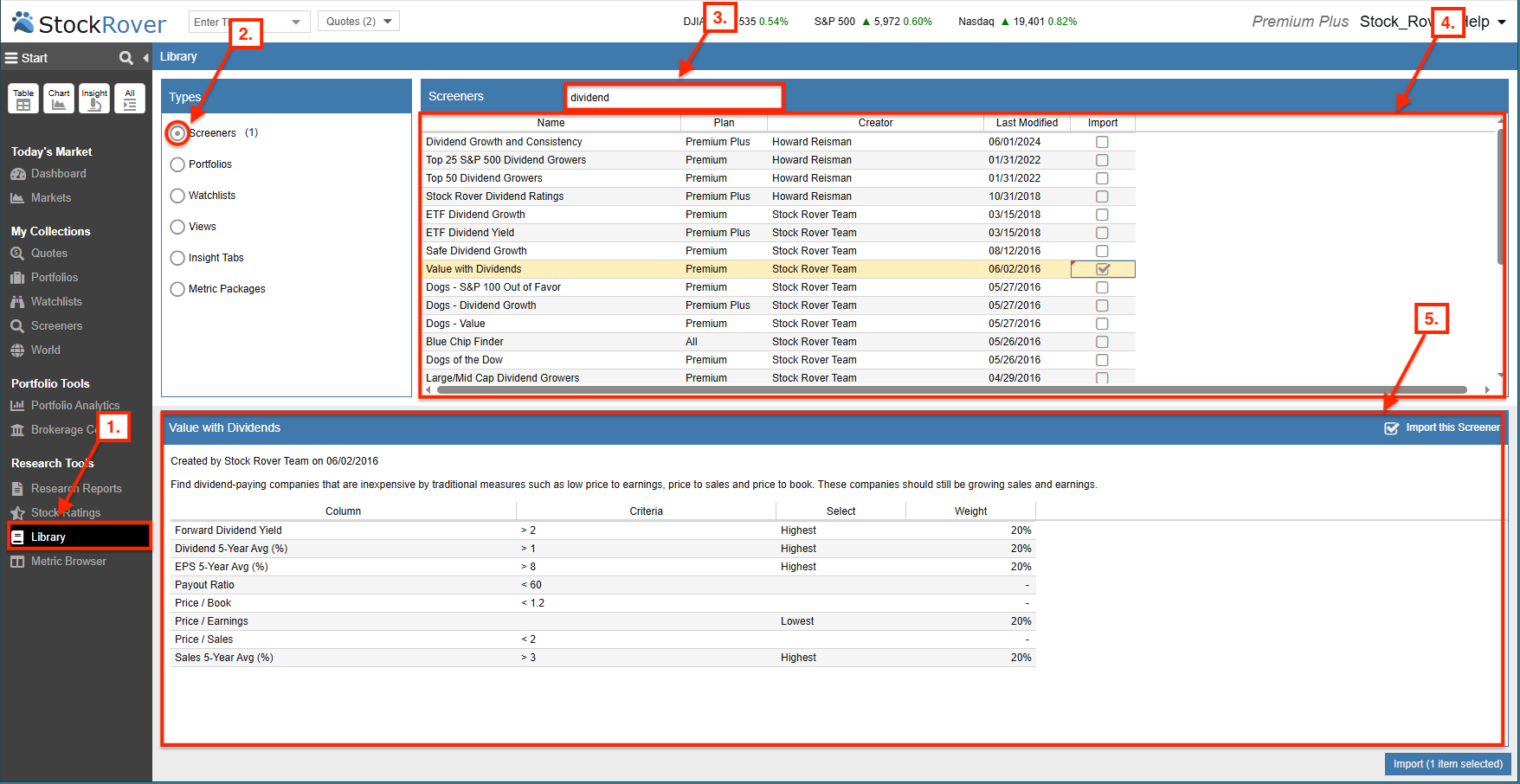
How to find Dividend Screeners:
- Open Library – Select Library from the Start Menu.
- Choose Category – Select the type of resource you wish to browse (e.g., Screeners).
- Search – Enter a keyword like “dividend” in the search box to filter the collection.
- Browse Results – Review the list of matching screeners returned in the pane.
- Preview & Import – Select a specific screener to view its full description and criteria before importing it into your account.